Digital Products & Product Data
CAD vs. 3D Modeling vs. 3D Rendering: What Do I Actually Need?
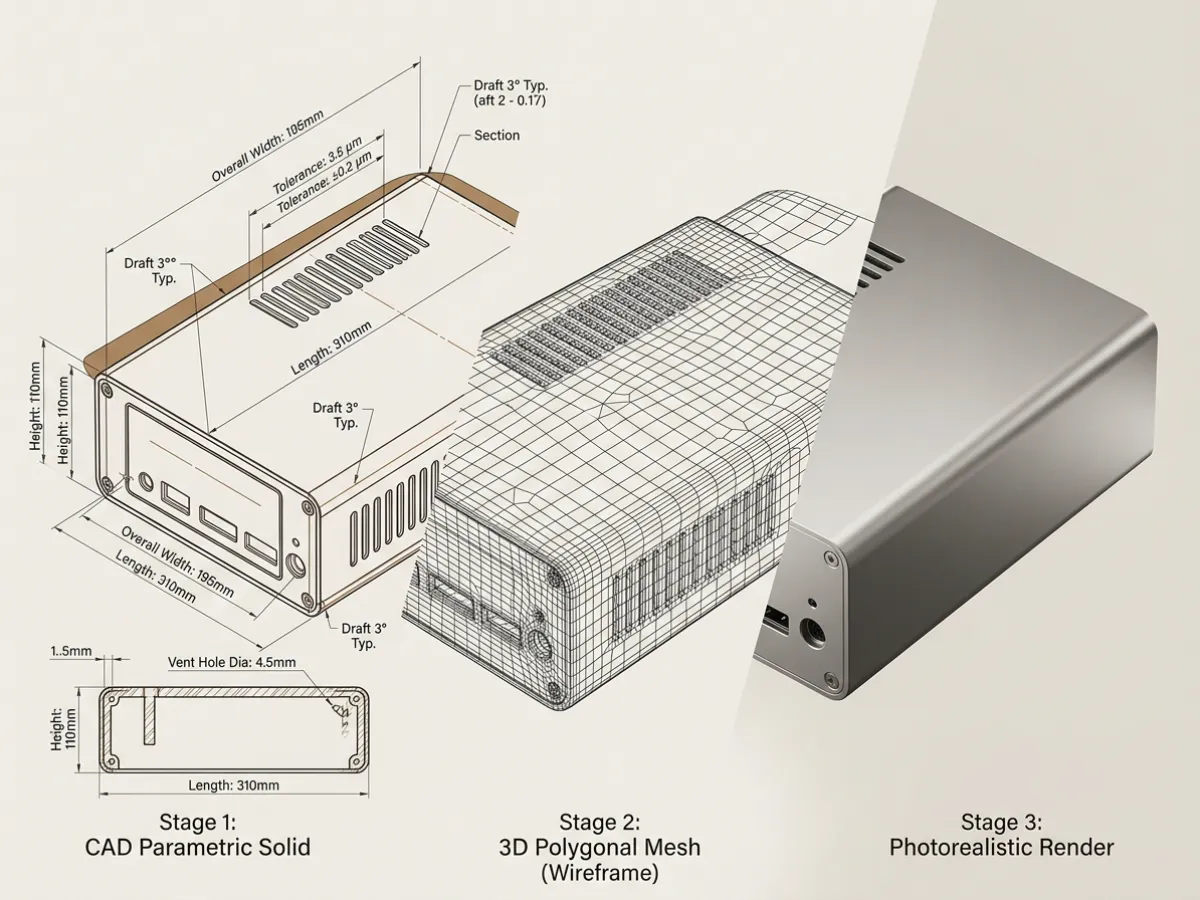
If you're trying to develop, manufacture, or market a product, you've probably heard some version of these terms:
CAD. 3D model. CGI. Rendering. STEP file. Digital twin.
They often get used interchangeably.
They shouldn't.
A CAD file, a visualization-ready 3D model, and a finished 3D rendering can all describe the same product, but they serve very different purposes.
So when a client asks us:
What files do I actually need?
Our answer is:
It depends on what you're trying to accomplish.
If you're engineering the product, you probably need CAD.
If you're preparing the product for visualization, configuration, or reuse across digital channels, you need a good 3D model.
If you need an image for a website, catalogue, campaign, or sales presentation, you need a render.
And in many projects, you eventually need all three.
The Simplest Way to Think About It
Think of the workflow like this:
CAD defines how the product is built.
↓
3D modeling prepares how the product exists digitally.
↓
3D rendering determines how the product looks in an image.
These are related steps.
They are not the same deliverable.
What Is CAD?
CAD stands for Computer-Aided Design.
CAD is primarily an engineering and manufacturing tool.
A CAD model describes the product in a way that helps designers, engineers, factories, and suppliers understand how it should be constructed.
Depending on the software and workflow, CAD information can include: - dimensions; - geometry; - assemblies; - individual components; - tolerances; - holes; - hardware locations; - joinery; - manufacturing features; - material specifications; - engineering relationships.
Common CAD formats include: - STEP / STP - IGES / IGS - SolidWorks files - Autodesk Inventor files - Fusion files - Parasolid files - Rhino files - other native engineering formats
For manufacturing, this information can be extremely valuable.
But a technically correct CAD model does not automatically make a good marketing image.
What Is CAD Best For?
CAD is primarily concerned with questions such as:
How big is it?
How does it fit together?
Where does this component attach?
How thick is this panel?
Can this be manufactured?
What changes if this dimension changes?
How does this assembly work?
In other words:
CAD is about the product's construction.
It is generally not concerned with making the product look beautiful.
What Is a 3D Model?
This is where terminology becomes confusing.
A CAD file is technically a type of 3D model.
But when visualization studios talk about 3D modeling, they are often talking about preparing or rebuilding geometry so that it works properly in a visualization environment.
That may involve taking engineering information and turning it into a model optimized for: - rendering; - materials; - animation; - ecommerce; - configurators; - augmented reality; - real-time environments; - digital asset libraries.
This model may originate from CAD.
Or it may be created from: - drawings; - photographs; - sketches; - dimensions; - physical samples; - reference imagery.
Why Can't You Just Render the CAD File?
Sometimes you can.
Sometimes you shouldn't.
Engineering CAD is created for engineering.
Visualization geometry is created for visualization.
Those objectives overlap, but they're not identical.
A manufacturing model may contain: - unnecessary internal components; - screws; - hidden hardware; - machining details; - extremely dense geometry; - complex assemblies; - construction information that never appears in the final image.
At the same time, it may be missing details that matter visually.
For example: - realistic fabric softness; - upholstery seams; - piping; - stitching; - edge treatments; - small bevels; - natural material irregularity; - visually correct gaps; - decorative details.
So one of the first jobs in a visualization workflow is often:
Decide what engineering information should survive into the visual model.
The goal isn't simply to make the model lighter.
The goal is to preserve the product's identity while preparing it for a different purpose.
A Simple Furniture Example
Imagine we're visualizing a cabinet.
The manufacturer's CAD model may accurately define: - overall width; - overall height; - carcass dimensions; - shelf positions; - door dimensions; - hinge locations; - drawer dimensions; - hardware placement.
That's excellent source information.
But a high-quality CGI asset may also require: - subtle edge bevels; - realistic panel gaps; - accurate wood grain direction; - correct veneer mapping; - finish definition; - hardware materials; - appropriate surface imperfections; - visual treatment of seams and joints.
The CAD tells us:
What is the product?
The visualization model prepares that product to answer:
What should it look like?
What Is 3D Rendering?
Rendering comes later.
A 3D render is an image or animation created from the 3D scene.
At this stage we are no longer primarily designing the geometry.
We are deciding how that geometry should appear.
Rendering involves things such as: - camera position; - lighting; - environment; - materials; - reflections; - shadows; - composition; - styling; - visual mood; - image resolution; - final output.
The result might be: - a white-background ecommerce image; - an architectural lifestyle scene; - a catalogue image; - a close-up detail; - a finish variation; - an animation; - campaign imagery.
The Important Difference: Asset vs. Output
This distinction is worth remembering.
CAD
Primarily an engineering asset.
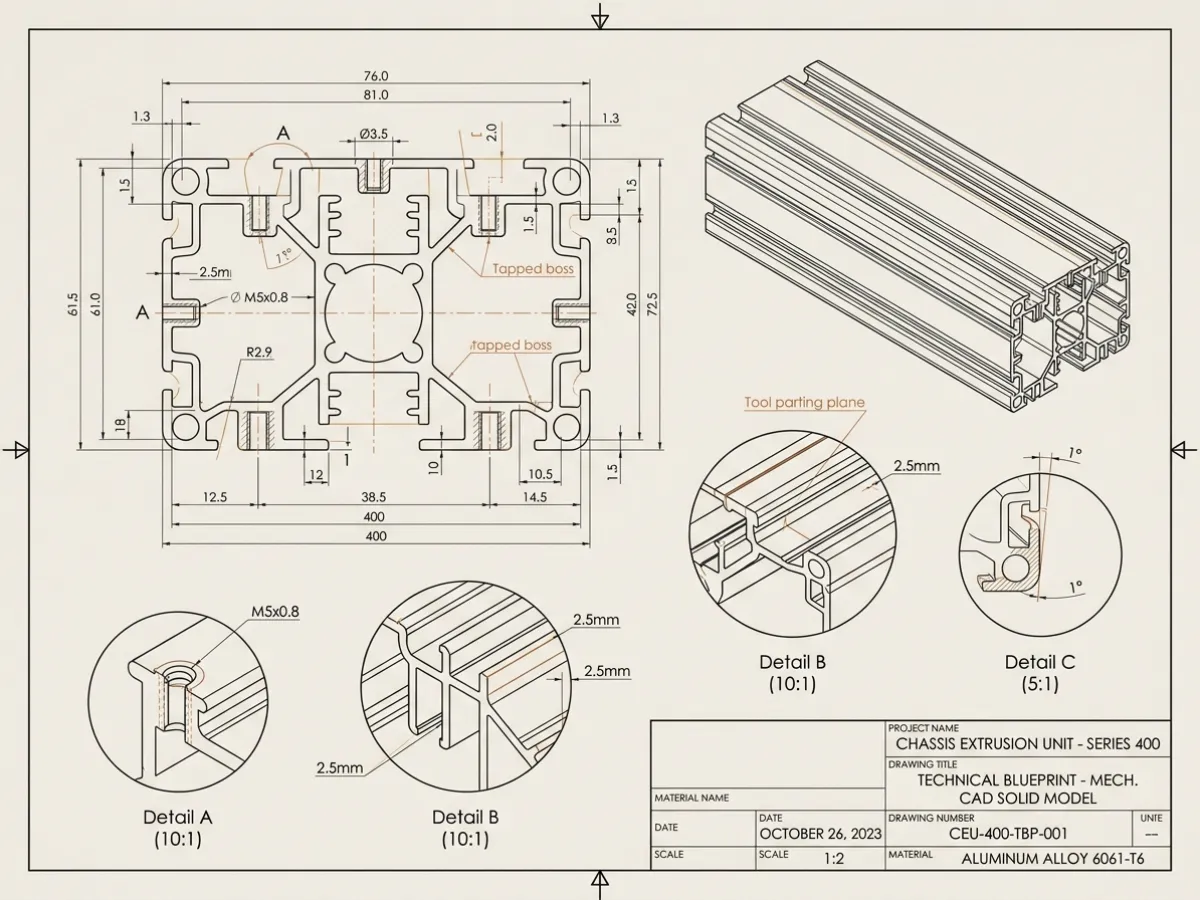
01 / Parametric CAD Solid
Visualization-Ready 3D Model
Primarily a **reusable digital product asset**.
Render
Primarily an output.
That's why a client asking:
How much does a render cost?
may actually be asking several different questions at once.
Before the image can be rendered, we need to know:
Does the product already exist digitally?
Is the geometry accurate?
Is it usable for visualization?
Are materials defined?
Does it need to be modeled first?
What If I Already Have a STEP File?
Great.
A STEP file can be an excellent starting point.
It means we may already have reliable information about the product's geometry.
But receiving a STEP file does not necessarily mean the product is immediately ready to render.
We still need to evaluate: - geometry quality; - assembly structure; - complexity; - missing parts; - surface quality; - level of detail; - material information; - visual requirements.
Sometimes the CAD imports beautifully.
Sometimes considerable cleanup is required.
Sometimes parts need to be rebuilt.
The correct answer is determined by the actual file.
What If I Don't Have CAD?
That doesn't necessarily prevent us from creating the product.
A visualization model can often be built from other information.
Useful inputs can include: - dimensioned drawings; - technical drawings; - sketches; - product photography; - prototypes; - reference imagery; - dimensions; - finish samples; - material specifications.
The better the source information, the more confidently the product can be reconstructed.
For a product where dimensional accuracy is important, however, photography alone may not provide enough information.
A photograph shows us what something looks like.
It doesn't necessarily tell us exactly how large it is.
What If I Only Have Product Photos?
We can often work with them.
But there is an important distinction between:
Looks like the product
and:
Is an accurate digital representation of the product
A photograph contains perspective.
That means dimensions and proportions cannot always be recovered reliably from a single image.
Additional information such as: - known overall dimensions; - multiple viewpoints; - drawings; - measurements; - detail photographs;
can greatly improve the result.
If the model will later be used for engineering or manufacturing, photographic reconstruction alone is usually not the appropriate substitute for engineering information.
What If I Have CAD but Only Need Ecommerce Images?
Then the workflow may be relatively straightforward:
CAD
↓
Geometry preparation
↓
Visualization-ready model
↓
Materials
↓
Lighting
↓
Camera
↓
Render
↓
Ecommerce image
But the important point is that the ecommerce image is not the CAD file.
The CAD is part of the information used to produce the image.
What If I Need Multiple Finishes?
This is where 3D becomes especially useful.
Once we have a good underlying product model, we may be able to produce variations without rebuilding the entire product.
For example:
One cabinet model could potentially generate: - white oak; - walnut; - black oak; - painted finish; - alternative hardware; - different backgrounds; - different camera angles.
The geometry remains controlled while the visual presentation changes.
This is one of the reasons creating a strong reusable asset library can be more valuable than thinking about CGI one image at a time.
What If My Product Isn't Manufactured Yet?
This is one of the biggest advantages of working digitally.
If reliable design information exists, CGI can often begin before finished production samples exist.
That can allow companies to prepare: - sales materials; - retailer presentations; - ecommerce assets; - catalogues; - marketing campaigns; - showroom concepts;
while manufacturing is still being completed.
This can help compress the gap between:
product development
and
market launch.
CAD vs. 3D Modeling vs. Rendering
| CAD | Visualization 3D Model | 3D Render | |
|---|---|---|---|
| Primary purpose | Engineering & manufacturing | Reusable digital representation | Finished visual output |
| Contains geometry | Yes | Yes | No - image output |
| Contains dimensions | Usually | Can | Not reliably |
| Manufacturing focused | Yes | Usually no | No |
| Visualization focused | No | Yes | Yes |
| Materials | Technical / limited | Visual materials | Visible in final image |
| Reusable | Yes | Yes | Limited as a fixed image |
| Produces final marketing imagery | Not by itself | Not by itself | Yes |
| Can support animation | Sometimes after preparation | Yes | Final animation is the output |
| Useful for configurators / AR | Usually requires conversion | Yes, if properly prepared | No |
So What Do I Actually Need?
Here is the practical answer.
If You're Designing or Manufacturing a Product
You probably need:
CAD.
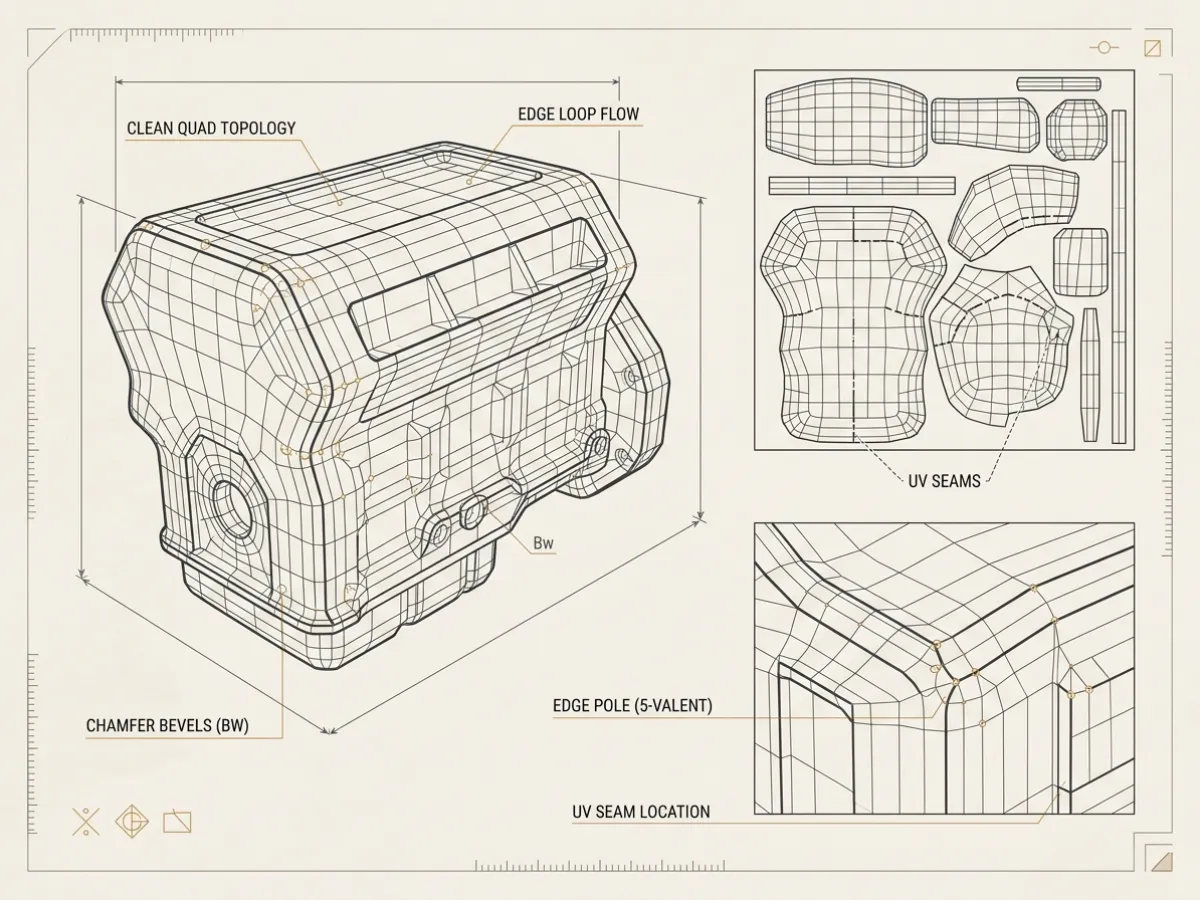
02 / Polygonal Mesh Modeling
If You Want a Reusable Digital Product Asset
You probably need:
a properly prepared 3D model.
If You Need Images for Ecommerce or Marketing
You need:
renders.
If You Need All Three
That's normal.
A complete workflow might look like:
Idea
↓
Product Design
↓
CAD
↓
Engineering
↓
Visualization-Ready 3D Asset
↓
Materials
↓
CGI / Rendering
↓
Ecommerce
↓
Campaigns
↓
Animation
↓
Configurators
↓
AR / Spatial
The further the asset needs to travel, the more important it becomes to think beyond the final image.
The Source-of-Truth Question
One useful way to evaluate your files is to ask:
Where does the authoritative definition of this product live?
For some companies, that's CAD.
For others, it may be a PLM or engineering system.
For products being developed visually, it may temporarily live in another controlled 3D environment.
Whatever the system is, the important part is maintaining a reliable relationship between:
the actual product
and
the digital product.
That becomes increasingly important as the same asset is reused across more channels.
Where AI Fits
Generative AI adds another layer to this workflow.
AI can increasingly help with: - ideation; - environments; - image variations; - styling; - retouching; - visual exploration; - concept development.
But that doesn't remove the distinction between:
product definition
and
image generation.
If the exact identity of the product matters, maintaining an authoritative digital representation remains valuable.
AI can help create the world around the product.
The underlying product data tells us what the product actually is.
Suggested SEO Information
SEO Title:
CAD vs. 3D Modeling vs. 3D Rendering: What Do I Actually Need?
Suggested URL:
/cad-vs-3d-modeling-vs-rendering/
Meta Description:
What's the difference between CAD, 3D modeling, and 3D rendering? Learn which files you need for manufacturing, CGI, ecommerce imagery, and reusable digital product assets.
Primary Topic:
CAD vs. 3D modeling vs. 3D rendering
Related Topics: - CAD for product rendering - STEP files for CGI - 3D product modeling - CGI product visualization - ecommerce rendering - CAD to CGI - product visualization workflow - 3D digital assets - product rendering requirements
Recommended Visual
Create one simple infographic:
One Product. Three Different Jobs.
CAD
Defines the product
Show:
technical / engineering geometry
↓
3D MODEL
Prepares the digital product
Show:
clean visualization geometry + materials
↓
RENDER
Presents the product
Show:
finished photorealistic lifestyle image
This visual could become: - the article hero graphic; - a LinkedIn carousel; - an FAQ graphic; - a sales explanation; - an onboarding aid.
Recommended CTA
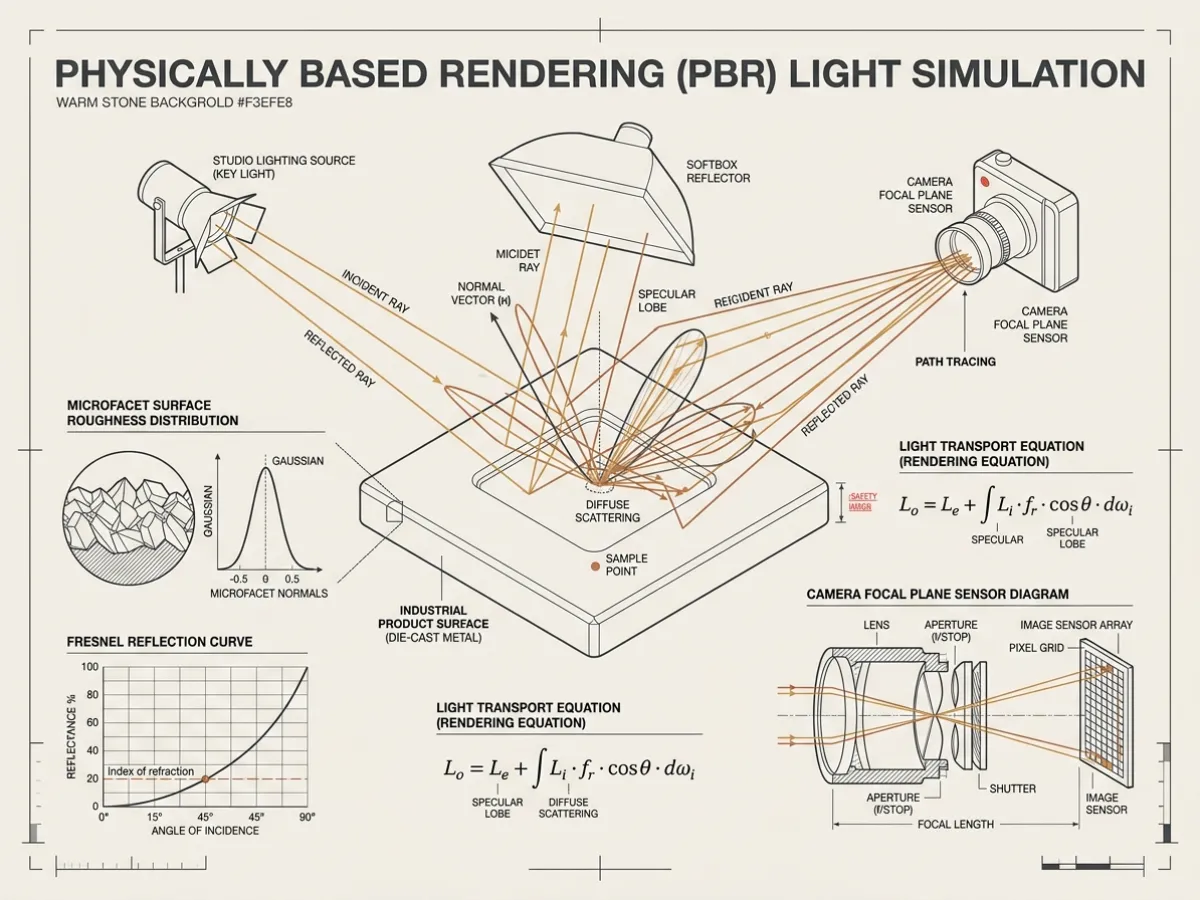
03 / Raytraced PBR Rendering
Not Sure What Files You Have?
Send us what you've got.
We'll review the CAD, drawings, photographs, or references and tell you what can be used, what needs preparation, and what - if anything - still needs to be created.
START A PROJECT →
Core Position
CAD defines it. 3D models prepare it. Rendering presents it.
The question isn't which one is best.
The question is:
What does your product need to do next?
Frequently asked questions
Is a CAD File the Same as a 3D Model?
Technically, CAD models are 3D models. In production workflows, however, the term **3D model** often refers to geometry prepared specifically for visualization, animation, ecommerce, AR, or similar applications. A CAD file may therefore need preparation or conversion before it becomes a useful visualization asset.
Can You Make a Render Directly From CAD?
Sometimes. The answer depends on the quality and complexity of the source CAD. Most visualization workflows still involve evaluating and preparing the geometry before final materials, lighting, and rendering are applied.
Is a STEP File Enough for CGI?
A STEP file can be an excellent starting point. Whether it is sufficient depends on: - geometry quality; - missing details; - required accuracy; - product complexity; - intended output. We normally evaluate the file before determining how much additional modeling or cleanup is required.
Do I Need CAD for Product Rendering?
Not always. Products can often be modeled using: - drawings; - dimensions; - photographs; - sketches; - physical samples. CAD is particularly valuable when dimensional accuracy and precise construction matter.
Can You Build a 3D Model From Photographs?
Yes, depending on the product and the required accuracy. Multiple photographs, known dimensions, and technical references greatly improve the ability to reconstruct the product accurately.
Do I Own the 3D Model or Just the Images?
This depends on the commercial agreement. It should be established clearly at the beginning of the project because the underlying 3D asset can have significant long-term value beyond the initial rendering.
Can One 3D Model Be Used for Multiple Images?
Yes. That's one of the main advantages of building the product digitally. The same underlying model may support: - multiple viewpoints; - finish variations; - lifestyle scenes; - white-background images; - animations; - configurators; - AR experiences.
What's the Difference Between CGI and Rendering?
**CGI** means computer-generated imagery and describes the broader field or resulting imagery. **Rendering** is the process used to generate an image or animation from a 3D scene. In everyday commercial usage, people often use the terms interchangeably.
What's the Difference Between 3D Modeling and Rendering?
**Modeling creates the object.** **Rendering creates the image of the object.** A model is reusable. A rendered image is one particular output from that model.
Should I Ask My Factory for CAD Files?
If the factory has accurate CAD and you have permission to use those files, they can be extremely useful for product visualization. Ask for formats such as: - STEP / STP; - IGES; - Parasolid; - native CAD files where appropriate. Also confirm that the files represent the final product revision.
What Should I Send Vux & Hoy?
Send whatever you have. Useful inputs include: - CAD files; - STEP files; - technical drawings; - dimensions; - sketches; - reference photographs; - material samples; - finish references; - physical product photography; - brand standards. We can then determine: **what already exists,** **what needs to be prepared,** and **what needs to be created.** You do not need to diagnose the production workflow before contacting us. That's part of our job.
Tell us what you are working on.
Send an idea, a drawing, a sample or a whole assortment. We will identify what is missing and the right next step.
Start a conversation